Installation Guide

Step-by-step to a ready-to-use MessMAX® installation

Customer Center  ›  Installation

1
Download via browser

Download MessMAX® Setup

  • Click your customer-specific MessMAX® download link from the e-mail you received
  • Download MessMAX®
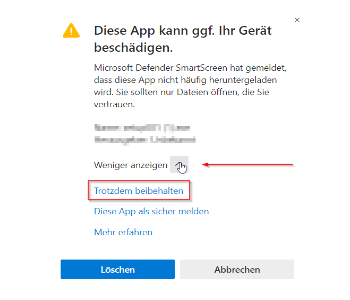
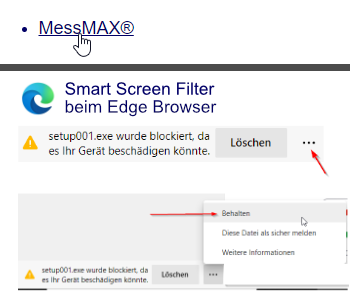
  • If Microsoft Edge Smart Screen Filter is active: click "Keep file"

2
Install setup as administrator

Install the Setup

Recommendation: First back up your existing MessMAX® installation. Copy the "MessMAX" folder including its subfolders to a backup drive.
Tip: Install the new setup into the existing MessMAX® directory – your projects and settings will be preserved.
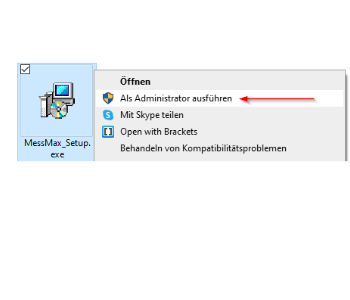
  • After the download, start SetupMessMAX.exe
  • Run as administrator (right-click on the setup file)
  • Follow the installation routine and install MessMAX®
3
Bypass Smart Screen Filter

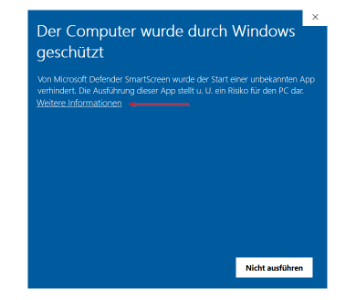
Smart Screen Filter blocks the installation?

  • Open the "show more" arrow
  • Click "Keep anyway"
  • Click "More information"
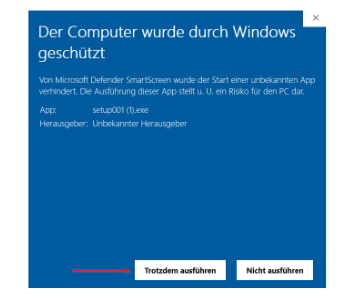
  • Click "Run anyway"
  • The setup will then install normally
4
Install AD driver

Install AD driver

  • Download the current AD driver
  • Install with administrator rights
  • Only connect the MessBOX via USB after the driver installation

Any questions about the installation?

We are happy to help you personally – direct from the manufacturer.

Contact us →